Introduction:
Modern bakeries are no longer limited to traditional counter-based ordering. Customers increasingly expect faster service, clear product information, convenient payment options, and the flexibility to customize their purchases. For busy bakeries, especially those located in shopping malls, high-traffic areas, food courts, and commercial districts, managing long queues while maintaining good customer service can be challenging.
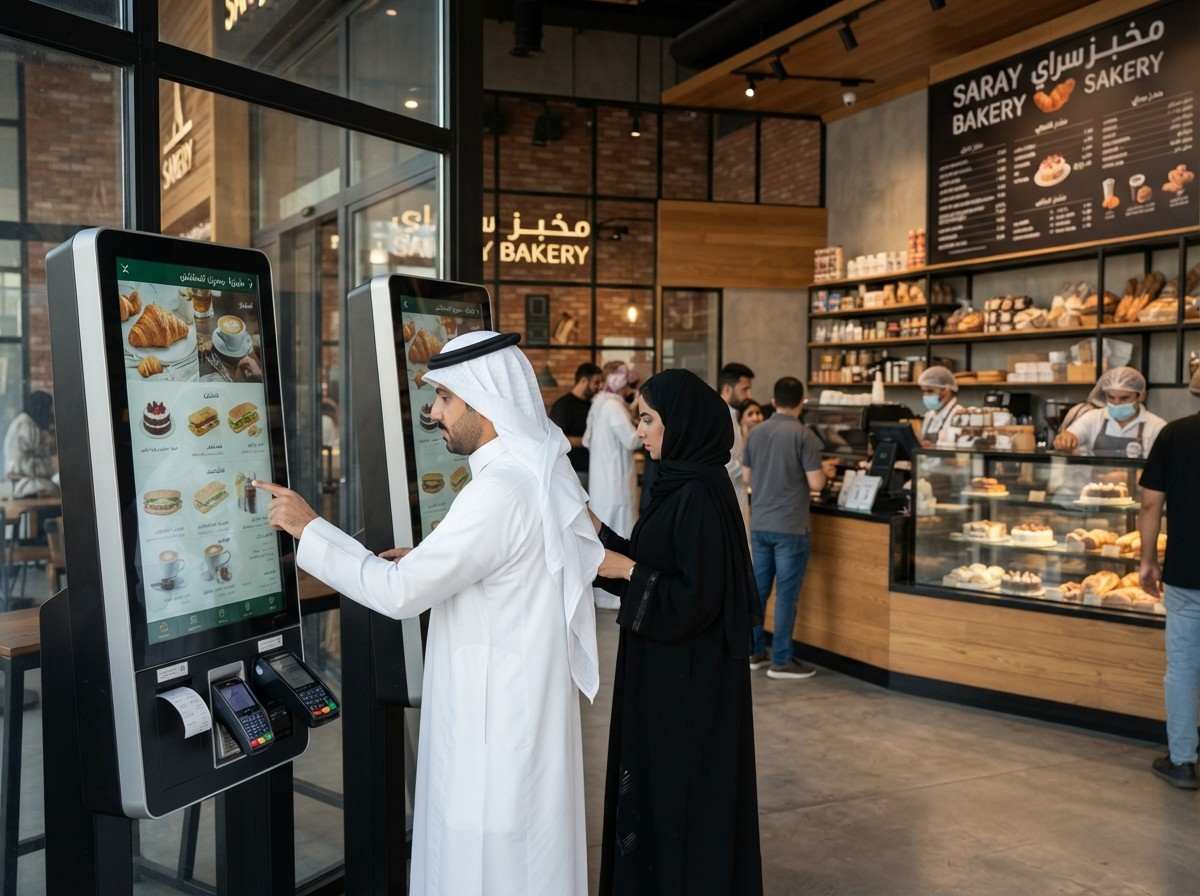
Self-ordering kiosks for bakeries provide a practical way to improve the ordering experience while helping bakery teams manage customer demand more efficiently. Customers can browse products, select quantities, customize available options, review their order, and complete payment through an interactive touchscreen.
When connected with the bakery’s POS and kitchen or production workflow, kiosk orders can move digitally through the operation instead of requiring staff to manually enter every order.
For bakeries, the purpose of a self-ordering kiosk is not simply to reduce interaction with staff. Instead, it can create an additional ordering channel while allowing employees to focus on preparation, packaging, customer assistance, and order fulfillment.
What Is a Self-Ordering Kiosk for a Bakery?
A self-ordering kiosk for a bakery is an interactive touchscreen system that allows customers to independently browse a bakery’s products and place an order.
Depending on the bakery’s menu and technology setup, customers can use a kiosk to:
- Browse breads, pastries, cakes, desserts, and beverages
- View product images and descriptions
- Select product quantities
- Choose sizes or available variations
- Add toppings, fillings, or other modifiers
- Create combos or meal selections
- Review the complete order
- Select dine-in or takeaway options
- Complete supported digital payments
- Receive an order confirmation or number
Unlike a traditional digital menu board, a self-ordering kiosk is interactive. Customers do not simply view products; they can build and submit their order directly through the touchscreen.
Why Are Self-Ordering Kiosks Useful for Bakeries?
Bakeries often experience customer traffic in short, concentrated periods. Breakfast hours, lunch breaks, weekends, holidays, and special occasions can create sudden increases in demand.
A traditional counter can become a bottleneck when several customers are waiting to order while staff are simultaneously handling payments, packaging products, answering questions, and preparing orders.
A bakery self-ordering kiosk creates another way for customers to place orders.
Customers who prefer self-service can use the kiosk, while customers who need assistance can continue ordering directly from bakery staff.
This creates a more flexible customer service environment instead of forcing every customer through the same ordering process.
1. Reduce Queues During Busy Bakery Hours
Long queues can negatively affect the customer experience, particularly when customers are purchasing simple products such as pastries, sandwiches, coffee, or takeaway items.
Multiple self-ordering kiosks can provide additional ordering points, allowing customers to start their orders without waiting for a cashier.
For bakeries with high foot traffic, this can help distribute ordering activity across the counter and self-service channels.
However, kiosks should be implemented as part of the overall workflow. If production, payment processing, or pickup is already the main bottleneck, simply adding more ordering terminals will not solve that constraint.
2. Make Bakery Menus Easier to Explore
A bakery may have dozens or even hundreds of products across different categories.
For example:
Bread → Pastries → Cakes → Sandwiches → Desserts → Coffee → Beverages
A digital kiosk can organize these categories visually, making it easier for customers to browse the available products.
High-quality product images can also help customers understand what they are ordering, particularly when product names alone do not provide enough information.
This can create a more engaging ordering experience while reducing the need for staff to explain every menu item individually.
3. Simplify Product Customization
Customization is particularly important for bakeries selling cakes, sandwiches, beverages, and made-to-order products.
Depending on the bakery’s offerings, customers may need to select:
- Cake size
- Flavor
- Filling
- Toppings
- Quantity
- Bread type
- Beverage size
- Additional ingredients
- Packaging options
A self-ordering kiosk can guide customers through these choices step by step.
The customer can see their selections before checkout, which provides an additional opportunity to review the order and confirm the requested options. Structured digital ordering can also help reduce the need for staff to interpret complex requests verbally.
4. Improve Customer Ordering Accuracy
Miscommunication can happen when customers verbally describe multiple products or customizations at a busy counter.
A kiosk allows customers to enter their own selections and review the order before submitting it.
For example, instead of verbally requesting a customized cake or sandwich, the customer can select each available option directly from the screen.
When the kiosk is integrated with the bakery’s POS and production workflow, the structured order can be transferred digitally, reducing manual re-entry between systems.
This does not eliminate every possible error, but it can make the ordering process more transparent for both customers and employees.
5. Provide Consistent Upselling Opportunities
Bakery staff may not have enough time to recommend additional products when a long queue is forming.
A self-ordering kiosk can display relevant recommendations as part of the ordering journey.
For example:
Croissant → Add Coffee → Add Dessert → Upgrade to Combo
Or:
Birthday Cake → Add Candles → Add Greeting Message → Add Gift Packaging
These recommendations can be presented consistently without requiring staff to manually suggest every option.
The key is to keep recommendations relevant and easy to understand rather than interrupting the customer’s ordering process with unnecessary promotions. Kiosk systems can support modifiers, add-ons, combos, and promotional prompts as part of the digital ordering experience.
6. Give Customers More Control
Not every customer wants to place an order at a busy counter.
Some customers prefer taking their time to browse products, compare options, check prices, and customize their purchase.
A bakery self-ordering kiosk gives customers greater control over this process.
This can be particularly useful for customers ordering multiple items or products with several customization options.
The result is a customer experience where self-service is available without removing traditional counter service for customers who prefer personal assistance.
7. Help Bakery Staff Focus on Customer Service
One of the biggest misconceptions about self-ordering kiosks is that they are designed simply to replace employees.
A more practical approach is to use kiosks to handle routine order-entry activities while bakery employees focus on areas where human assistance adds value.
Staff can spend more time on:
- Preparing and packaging orders
- Helping customers who need assistance
- Managing pickup
- Maintaining product displays
- Handling special requests
- Supporting customers at the counter
- Managing bakery operations
This can create a combination of self-service convenience and human customer support rather than choosing one over the other.
What Features Should a Bakery Self-Ordering Kiosk Have?
Before choosing a kiosk solution, bakery operators should consider the complete technology ecosystem rather than the touchscreen hardware alone.
Digital Menu Management
The system should make it easy to manage products, prices, categories, images, modifiers, promotions, and availability.
POS Integration
POS integration is essential for an efficient bakery kiosk setup.
Ideally, orders should flow from the kiosk into the bakery’s POS without requiring employees to manually enter the same order again. This helps maintain consistent pricing and menu information across ordering channels.
Payment Integration
The kiosk should support the payment methods appropriate for the bakery’s market, including supported card, contactless, QR, or other digital payment options.
Order and Production Integration
For bakeries preparing customized or made-to-order products, kiosk orders should reach the appropriate staff or production workflow with the customer’s selections clearly displayed.
Product Images
Visual menus are especially useful for bakeries because customers often make purchasing decisions based on product appearance.
Multi-Location Management
For bakery chains, centralized management can simplify updates to menus, prices, promotions, and product availability across multiple branches.
How FAMA Technologies Can Help Bakeries
FAMA Technologies provides self-ordering kiosk solutions that help businesses create more convenient, digitally connected ordering experiences.
For bakeries, FAMA can support the development of a kiosk environment around the business’s specific menu, ordering process, payment requirements, and operational workflow.
Rather than treating the kiosk as an isolated touchscreen, the solution can be planned as part of a broader digital ordering ecosystem involving the customer interface, POS connectivity, payments, order management, and operational processes.
This makes self-ordering kiosks suitable for bakeries, cafés, QSRs, food courts, and other high-volume food-service environments.
For bakery businesses with multiple locations, maintaining consistent digital menus and ordering processes can also become an important part of a scalable technology strategy.
Self-Ordering Kiosks for Different Bakery Businesses
Retail Bakeries
Traditional bakeries can use kiosks to help customers browse breads, pastries, cakes, beverages, and other products without depending entirely on counter staff.
Café-Bakery Concepts
Bakeries that combine food and beverages can use kiosks to create complete orders, including pastries, sandwiches, coffee, and drinks.
High-Volume Bakery Outlets
Busy locations can use multiple kiosks to create additional ordering capacity during peak periods.
Bakery Chains
Multi-location bakery brands can benefit from centralized menu management and consistent ordering experiences across branches.
Best Practices for Implementing a Bakery Ordering Kiosk
A successful kiosk deployment starts with understanding the actual customer journey.
First, identify where customers experience delays. Look at peak-hour queues, frequently ordered products, customization requirements, payment processes, and pickup workflows.
Next, organize the kiosk menu around how customers naturally shop. Popular products should be easy to find, while categories and customization options should remain simple.
The interface should also minimize unnecessary steps. Customers should be able to move from product discovery to checkout without navigating through confusing screens.
Before launch, test the complete workflow, including product availability, customized orders, payment failures, order modifications, refunds, and connectivity issues.
Staff should also be available to assist customers during the initial rollout. The objective is to introduce another convenient ordering option—not create a barrier between customers and bakery employees.
The Future of Customer Service in Bakeries
Customer service in modern bakeries is increasingly connected to convenience and technology.
A self-ordering kiosk for bakeries can provide customers with more control while helping businesses manage ordering activity more efficiently. When combined with clear digital menus, POS integration, payments, product customization, and effective staff workflows, kiosks can become a valuable part of the bakery’s digital ordering strategy.
The most effective approach is not simply installing a touchscreen. It is creating an integrated customer journey where technology handles routine ordering tasks while employees remain available for service, assistance, and bakery operations.
For bakeries looking to reduce ordering bottlenecks, simplify customization, and offer a more convenient customer experience, FAMA Technologies’ self-ordering kiosk solutions can help create a scalable digital ordering environment tailored to the business.